
Designing an AI Booking Agent for service businesses
Helping home service pros fix misconfigured online booking — through a conversational agent that surfaces high-impact improvements they can accept or skip.
At Housecall Pro, a long tail of online booking users had enabled the feature but never configured it well. Many didn’t know what a good setup looked like — incomplete services, wrong availability, vague copy — and a bad configuration can quietly kill conversion entirely. Plenty of pros were getting zero bookings without understanding why.
We discovered this gap and set out to improve it: help more users reach a working online booking setup, increase conversion across the board, and fix the configuration problems that were leaving money on the table.
This project tackles that directly — an interactive, agentic experience where pros review configuration improvements one at a time, accept or decline each suggestion, and move on to the next highest-impact change. The UI stays simple and conversational rather than dumping them into another settings maze.
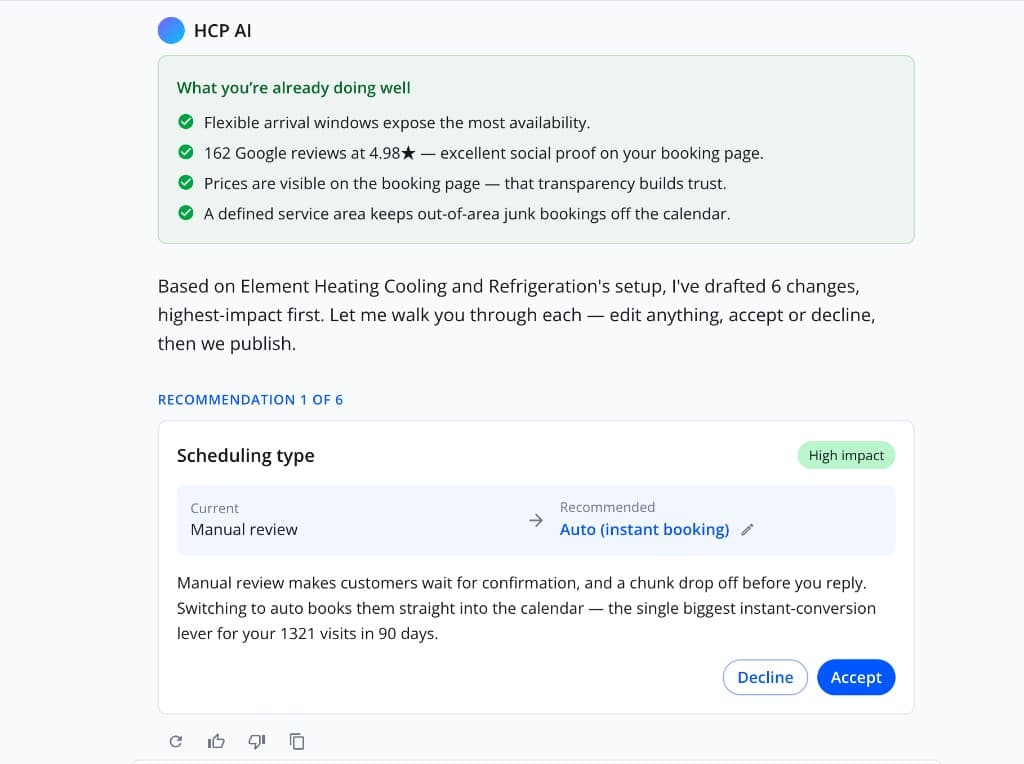
Interactive prototype
A dynamic prototype with multiple scenarios — see how the recommendation system responds to different booking configurations.
Open prototypeGrounding suggestions in real data
To properly help users fix their setup, we first had to define what “good” online booking actually looks like. We analyzed product data and studied top-performing HVAC pros — what they configured, how their services were structured, and what separated high-converting booking pages from ones that stalled.
From that research, we built a set of guidelines: clear rules about what strong configuration looks like across services, availability, copy, and flow. Those guidelines were then fed into the AI so suggestions weren’t generic — they reflected patterns that were already working for the best performers in the category.
The prototype is dynamic and built to stress-test that system. It includes a range of different scenarios — incomplete setups, misconfigured availability, weak service descriptions — and shows how the recommendation engine responds based on each starting configuration. Switch between them and you can see how the same underlying logic surfaces different improvements depending on what the pro actually has live today.
The agentic flow
The experience moves through clear states, like working with someone who knows the product:
- Look through your settings — the agent reviews the pro’s current online booking configuration
- Analyze — identify what’s misconfigured, incomplete, or likely hurting conversion
- Suggest — surface specific improvements, categorized by the impact they could have on the business
- Decide — the pro accepts or declines each change before anything is applied
- Continue — move to the next recommendation and keep improving the setup over time
Each step is one conversation, not a wall of options. The goal is steady progress toward a booking page that actually converts.
Setup diagnosis
The agent started by reading what was already live — service lists left half-finished, availability that didn’t match real working hours, descriptions too vague to convert, flows that didn’t reflect how the business actually operates.
For many users, the problem wasn’t that online booking was broken. It was that their configuration was — and they had no way to see it. The diagnosis step made those gaps visible in plain language before any change was proposed.
Recommendations ranked by impact
Suggestions weren’t presented as a flat checklist. Each improvement was categorized by the impact it could have on the business — what would move conversion most, what was quick to fix, what could wait.
That ranking helped pros focus on changes worth making first: rewrite a service description, tighten availability windows, fix routing rules that sent customers nowhere. One meaningful improvement at a time, ordered by what mattered most.
Human-in-the-loop by default
Nothing applied automatically. Every recommendation came with a clear summary of what would change on the live booking page, and the pro chose to accept or decline it.
That kept trust intact — especially for users who already felt unsure about their setup. The agent proposed; the pro decided. Skip what doesn’t fit, apply what does, and keep going.
A conversational UI
The interface stayed lightweight: short messages, obvious next steps, no dense admin panels. States like analyzing settings or waiting for approval were visible so the pro always knew where they were in the flow.
After one improvement was handled, the experience naturally continued to the next thing that could make the business better — building momentum without overwhelming someone who just wanted their booking page to start working.
Connecting to Online Booking settings
The agent didn’t replace existing settings. It sat on top of them — reading the same configuration pros would edit manually, proposing changes against real levers, and applying only what was approved.
When a pro accepted a suggestion, the update landed in the familiar Online Booking surfaces they already knew. The agent was the guide through a confusing setup problem; the product remained the source of truth.
Looking ahead, this booking agent is designed as one specialist in a broader Housecall Pro AI system. From a single conversational interface, the main AI could spin up focused agents like this one based on what the user is trying to accomplish — fix my booking setup, improve scheduling, adjust pricing, and so on. Each agent handles its domain, but they can work together when a request spans multiple areas, coordinating toward the outcome the pro actually wants rather than forcing them through separate tools.